

Claude Design changes this workflow completely. Claude just dropped a new design tool and it’s way more powerful than people realize. It builds full slide decks, landing pages, one-pagers, and mobile app prototypes from a single prompt. No more staring at a blank Figma file. No more wrestling with templates. Just upload a PDF, a screenshot, or a folder and it recreates the style for you.
It even has a feature called Design Systems that teaches Claude your exact brand so every single output looks like you made it. In this guide, You will learn exactly what Claude Design is, who gets access, and the step-by-step workflow.
Why Claude Design Is Changing How We Create?
The hardest part of design has never been the tools. It has always been the blank page.
Designers, marketers, founders, and creators often spend hours trying to move from idea → first draft. Wireframes take time. Templates feel generic. Hiring designers costs money. And learning tools like Figma can take months.
Claude Design changes this workflow completely.
This AI-powered design tool can generate:
- Full landing pages
- Investor pitch decks
- Mobile app prototypes
- Marketing one-pagers
- Interactive UI concepts
All from a single prompt.
Instead of starting with a blank canvas, you start with a finished draft you can refine.
This beginner-friendly guide explains exactly how Claude Design works, who gets access, and the proven six-step workflow you can use to turn ideas into polished designs within minutes.
What Is Claude Design?
Claude Design is an experimental web-based AI design workspace that converts prompts, screenshots, PDFs, and files into fully structured visual designs.
Think of it as the missing bridge between ideas and design execution.
Instead of manually designing layouts, Claude asks clarifying questions, understands your intent, and produces complete designs automatically.
What Claude Design Can Create
Claude Design is surprisingly versatile. It can generate:
- Marketing landing pages
- SaaS dashboards
- Mobile app prototypes
- Investor presentations
- Product one-pagers
- UI/UX wireframes
- Interactive mockups
This means non-designers can now create professional-looking visuals without deep design skills.
Who Gets Access to Claude Design?
Before you start, you need to understand availability.
- Available on the web only
- Requires a Pro subscription or higher
- Still in research preview
- Has its own weekly usage limits
Because this is an experimental tool, you may encounter occasional bugs. But the capabilities already rival traditional design workflows.
The 6-Step Claude Design Framework
To use Claude Design effectively, you need a repeatable workflow. Most beginners jump in and start prompting randomly. That leads to inconsistent results.
This framework prevents that.
Step 1 — Learn the Claude Design Interface
When you open Claude Design, you’ll see four main creation modes:
1. Prototype
Build apps, landing pages, dashboards, or product experiences.
You can choose between:
Wireframe Mode
- Fast idea exploration
- Simple layouts
- Low visual polish
High-Fidelity Mode
- Realistic visuals
- Styled UI elements
- Production-ready mockups
Beginners should start with High-Fidelity.
2. Slide Deck
Generate presentations automatically from prompts.
- Slide structure
- Content hierarchy
- Layout consistency
- Visual formatting
- Animation suggestions
3. From Template
Claude includes a library of starter templates you can browse and modify.
4. Custom Projects
Anything outside standard categories.
Workspace Overview
- Left Panel: Chat + prompts
- Right Panel: Visual output
- Top Tabs: Designs, Examples, Design Systems
Trending: ChatGPT vs Claude – Which One Is Better?
Step 2 — Create Your First AI Design
Example Prompt:
Build a landing page for a gumball machine bulk candy business with hero section, features, pricing, and footer.
Claude asks clarifying questions such as:
- Target audience
- Design vibe
- Colors and typography
- Number of sections
You can answer manually or say “Decide for me.”
Within minutes you receive a full website layout with navigation, hero section, features, pricing tables, and footer.
Step 3 — Generate Slide Decks & App Prototypes
Creating AI Pitch Decks
Create an animated investor pitch for a candy vending business.
Claude generates slide structure, layout, and presentation flow.
Creating Mobile App Prototypes
Create a mobile app where customers track machines, reorder inventory, and view sales.
Claude produces multiple screens, navigation flows, and dashboards.
Step 4 — Refining Your Designs Like a Pro
You have four editing methods:
1. Direct Editing
Click and edit text instantly.
2. Comment Editing
Leave feedback like “Make this button larger.”
3. Draw Editing
Sketch layouts and Claude builds them.
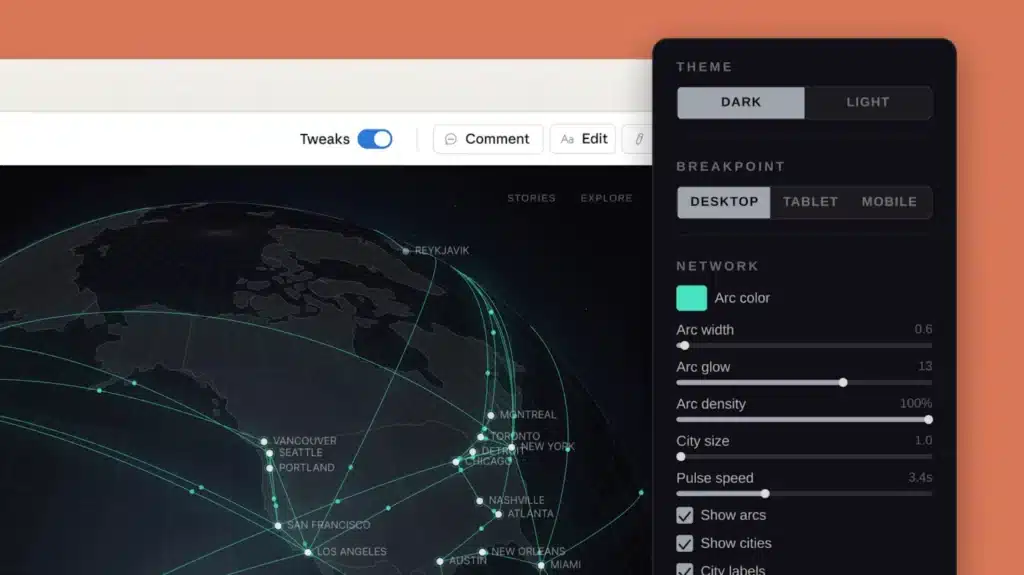
4. Tweaks Panel
- Change colors
- Switch layouts
- Toggle dark mode
Step 5 — Exporting Designs to Code
- Share with teammates
- Duplicate projects
- Save templates
- Generate share links
The most powerful option is handing the project to Claude Code.
Step 6 — The Most Important Feature: Design Systems
The Problem Without a Design System
Claude chooses colors, fonts, and styles by default.
What Is a Design System?
Your brand’s visual blueprint including:
- Color palette
- Typography
- Spacing rules
- Component styles
Once trained, Claude applies your brand automatically.
Most Relevant: Differences Between Opus 4.6 and Opus 4.7
Real-World Use Cases
Founders & Startups
- MVP prototypes
- Investor decks
- Landing pages
Marketers
- Campaign pages
- Lead magnets
- Presentation visuals
Agencies
- Client mockups
- Concept testing
- Wireframes
Freelancers
- Portfolio projects
- Client proposals
Limitations You Should Know
- Uses tokens quickly
- Research preview bugs may occur
- Creates designs, not full applications
Pro Tips for Best Results
- Start small
- Provide context
- Iterate often
- Build your design system early
- Ask for multiple layout variations
The Future of AI-Driven Design
The workflow is shifting from:
Idea → Sketch → Wireframe → Design → Prototype
to:
Idea → Prompt → Refinement → Production
Claude Design is not replacing designers. It is replacing the blank canvas.
Follow the six-step framework to turn raw ideas into polished designs in minutes.
Sources:











Leave a comment