

Nano Banana Pro Prompts (Insane 50+ Prompts That Unlock Studio-Quality Results)
Most people think Nano Banana Pro is limited by its interface.
It isn’t.
The real limiter is the prompt.
After spending over six hours testing prompt structures, refining language, and stress-testing output consistency, one thing became obvious: Nano Banana Pro with the right prompts produces results that rival studio work. That’s why today you’re going to have ready to use 50+ Nano Banana Pro Prompts.
Most users never see this level of quality because these prompts are not publicly documented, not included in tutorials, and not surfaced by default workflows.
This guide exists to change that.
Everything below is copy, paste, and done—no prompt engineering theory, no filler, no recycled fluff.
Trending: Latest Google Gemini AI Insane Updates
Why the Right Prompt Changes Everything in Nano Banana Pro
Nano Banana Pro is built to translate creative intent into visual and structured output rather than relying on generic generation patterns. According to Google’s official product documentation, the system is designed to help creators bring any idea or design to life through precise intent-driven generation rather than preset templates.
This means the quality ceiling is not determined by the tool itself, but by how clearly and specifically instructions are written. Prompt structure directly controls lighting logic, spatial awareness, edge preservation, and realism.
What Makes These Nano Banana Pro Prompts Different?
- Spatial awareness and perspective control
- Lighting continuity and realism
- Edge preservation without artifacting
- Depth-of-field accuracy
- Brand-safe visual consistency
These prompts avoid vague language and force specific visual instructions, which is where most prompts fail.
Source: How Nano Banana Pro helps you bring any idea or design to life
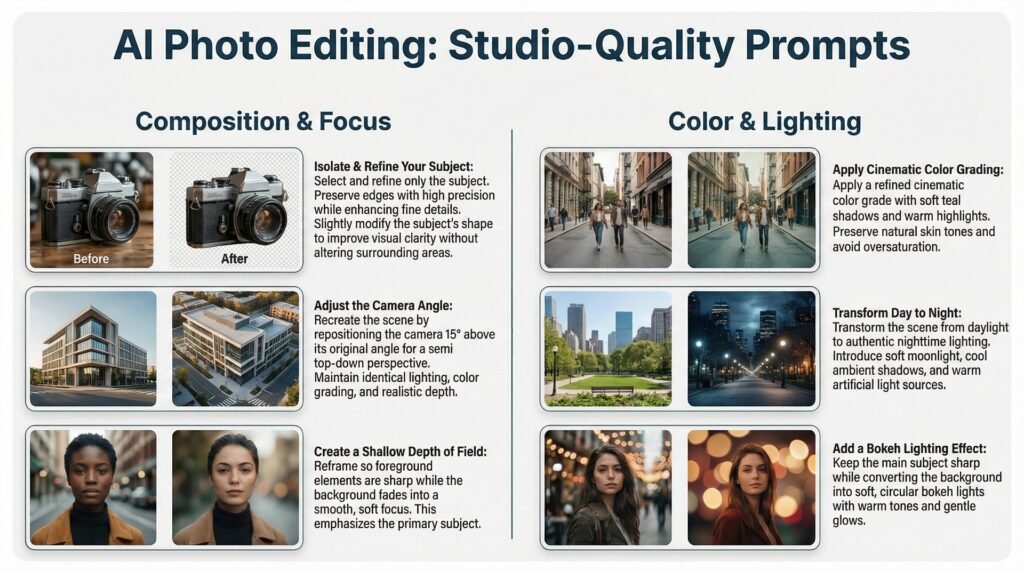
Studio-Quality AI Photo Editing Nano Banana Pro Prompts
1. Localized Editing / Select & Refine
Select and refine only the subject of the scene. Preserve all edges with high precision while enhancing fine details. Slightly modify the subject’s shape to improve visual clarity without altering surrounding areas. Maintain original lighting, color balance, and environmental realism. The subject should appear subtly more prominent without artificial sharpening.
2. Camera Angle Adjustment
Recreate the same scene by repositioning the camera 15° above its original angle to achieve a semi top-down perspective. Maintain identical lighting conditions and color grading. Ensure realistic depth, accurate shadows, and correct perspective distortion consistent with professional photography standards.
3. Change Focus / Depth of Field
Reframe the image so foreground elements remain perfectly sharp while background details fade into a smooth, professional soft focus. Apply shallow depth-of-field to emphasize the primary subject while preserving original color accuracy and lighting conditions.
4. Cinematic Color Grading
Apply a refined cinematic color grade with soft teal shadows and warm highlights. Preserve natural skin tones and avoid oversaturation. Introduce subtle contrast enhancement for a clean, polished look suitable for premium brand visuals.
5. Lighting Transformation (Day to Night)
Transform the scene from daylight to authentic nighttime lighting. Introduce soft moonlight highlights, cool ambient shadows, and warm artificial light sources. Maintain realistic reflections and natural light falloff to create an immersive nighttime atmosphere.
6. Bokeh Lighting Effect
Keep the main subject completely sharp while converting the background into soft circular bokeh lights. Use warm tones with gentle glow effects to achieve a cinematic night portrait aesthetic without compromising realism.
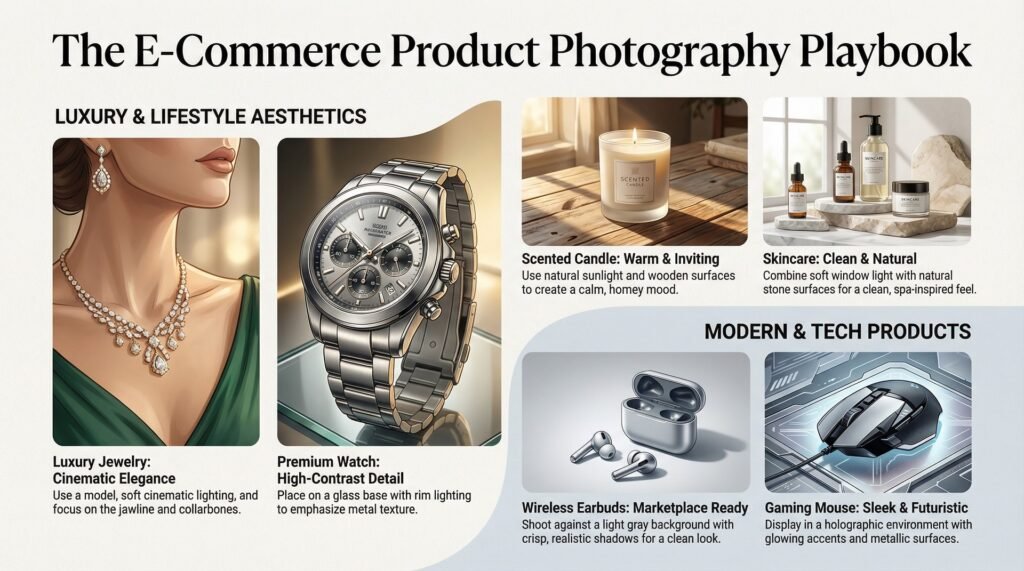
Product Photography Nano Banana Pro Prompts
7. Luxury Jewelry Close-Up
Show this necklace on a beauty model close-up, focusing on the jawline, collarbones, and reflective surface of the necklace. Use gentle cinematic lighting with soft shadows to highlight material quality.
8. Premium Watch Display
Place this luxury wristwatch on a glass base with rim lighting. Use high-contrast studio lighting to emphasize metal texture and dial details.
9. Lifestyle Candle Shot
Position the scented candle in a warm home environment. Use natural sunlight to create soft shadows on wooden surfaces for a calm, inviting mood.
10. Clean E-Commerce Earbuds Shot
Photograph wireless earbuds against a light gray background. Produce crisp, realistic shadows suitable for marketplace listings.
11. Skincare Spa Aesthetic
Place the skincare lotion on a natural stone surface. Use soft window light and spa-inspired elements to evoke calm and cleanliness.
12. Futuristic Gaming Mouse
Display the gaming mouse inside a holographic environment with glowing accents and metallic surfaces. Maintain sleek, modern design consistency.
New Release: Midjourney Niji V7 – Best Anime AI Model + 20 Free Prompts
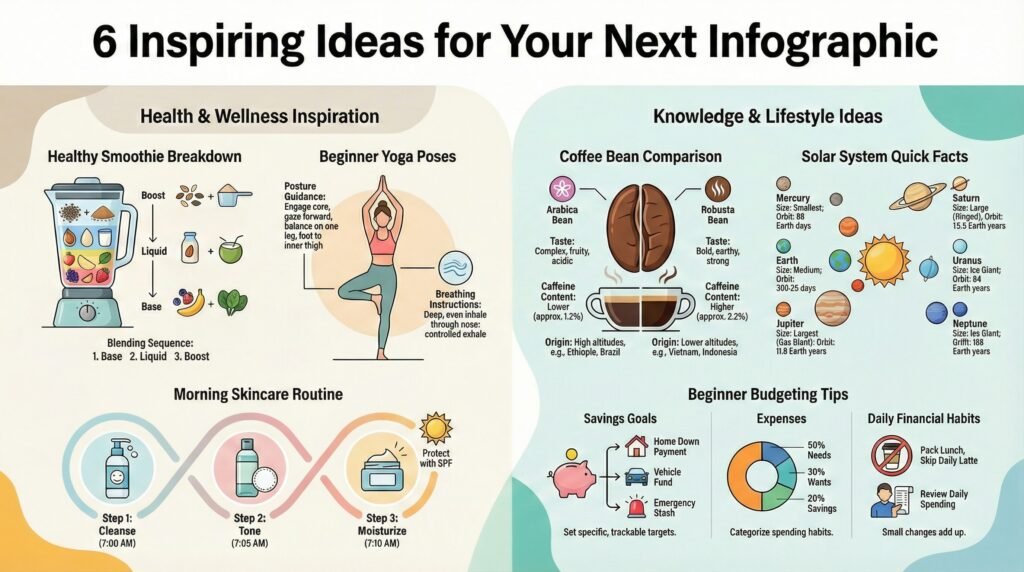
Infographic Creation Nano Banana Pro Prompts
13. Healthy Smoothie Breakdown
Create an infographic illustrating green detox smoothie ingredients, nutritional values, and blending sequence using clean visual hierarchy.
14. Beginner Yoga Poses Guide
Design an infographic showing five beginner yoga poses with simplified illustrations, posture guidance, and breathing instructions.
15. Coffee Bean Comparison
Develop an infographic comparing Arabica and Robusta beans, covering taste profiles, caffeine content, origin, and brewing methods.
16. Morning Skincare Routine
Visualize a simple morning skincare routine with step-by-step flow, product suggestions, and timing indicators.
17. Solar System Quick Facts
Present all planets with size, distance, orbit duration, and key facts using clear iconography and scale alignment.
18. Beginner Budgeting Tips
Create an infographic outlining five budgeting methods including savings, expenses, goals, and daily habits.
Storyboards, Branding & Visual Narratives
19. Logo Branding Set
Create a branding system including color palette, font pairings, icon styles, and a basic social media header layout.
20. Full Tech Startup Identity
Develop a complete brand identity for NovaEdge Systems with logo variations, typography, icons, and minimal futuristic aesthetics.
21. Corporate Mockups
Generate professional mockups showing the logo on business cards, letterheads, envelopes, social banners, and slide decks.
22. Visual Identity Guidelines
Create a structured identity system including spacing rules, grid usage, patterns, and print/digital templates.
23. Youthful Brand Display
Show Skyline Robotics branding across neon signage, packaging, apparel, and stickers with dynamic energy.
24. Creative Studio Identity
Build a visual identity for LumaCraft Studio including logo marks, monochrome versions, social visuals, and merchandise concepts.
UI/UX and Web Design Nano Banana Pro Prompts
25. Mobile Travel Planner App
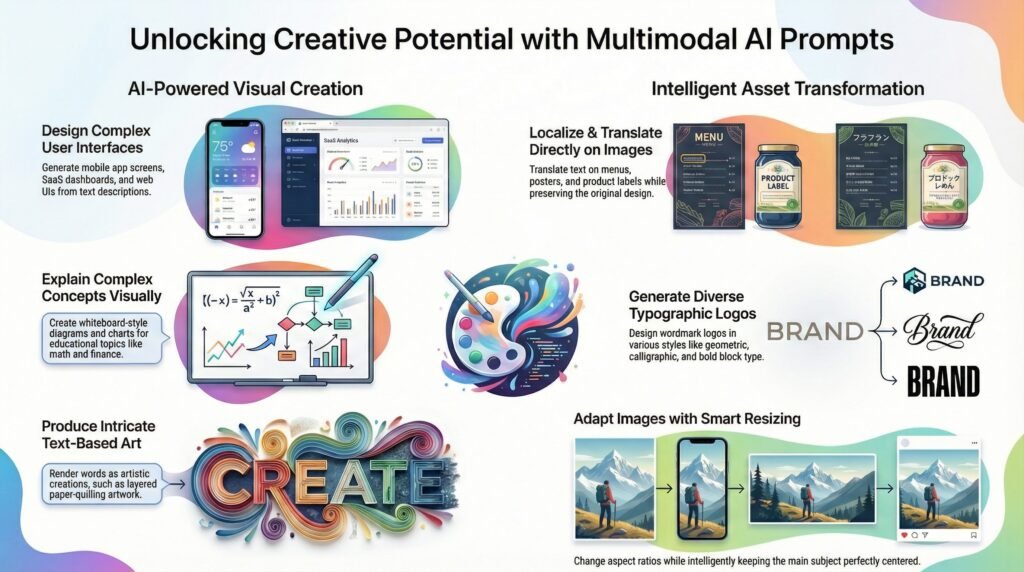
Design a mobile travel planner with a home dashboard, itinerary view, and booking screen. Include maps, timelines, and booking filters using a modern interface.
26. Productivity SaaS Dashboard
Create a SaaS dashboard with sidebar navigation, KPI overview, calendar widget, task list, and clean UI using cool blue-gray tones.
Multilingual Image Editing Nano Banana Pro Prompts
27. Menu Board Translation
Translate all English text on this café menu board into Thai while preserving original layout and design elements.
28. Humanized Text Rewrite
Rewrite the text into a more natural human tone while keeping the original language and matching the input length.
29. Movie Poster Translation
Translate all English content on this movie poster into Spanish while maintaining layout and typography alignment.
30. Cosmetic Label Localization
Convert all cosmetic bottle labels from English to Chinese while preserving spacing, icons, and alignment.
Typography Logo Nano Banana Pro Prompts
31–36. Geometric Tech Wordmarks
Design six futuristic wordmark logos using geometric shapes, monoline strokes, and minimalist tech aesthetics.
37–41. Organic Calligraphy Logos
Create five hand-drawn calligraphy logos with expressive brush strokes and natural line variation.
42–48. Bold Block Logos
Design seven bold typographic logos using distortion, stacking, slicing, and negative space techniques.
49–54. Rounded Playful Wordmarks
Create six rounded wordmark logos with friendly curves, bouncing baselines, and minimal vector styling.
Math, Reasoning & Educational Visuals
55. Pythagorean Theorem
Create a whiteboard-style visual explanation with labeled triangles and step-by-step annotations.
56. Compound Interest Explained
Illustrate compound interest using formulas, arrows, charts, and a real calculation example.
57. Fractions Made Easy
Explain fraction addition visually using grids, shapes, and handwritten-style notes.
Text Art Rendering Nano Banana Pro Prompts
58. DREAM Paper Quilling
Create a paper-quilling artwork spelling “DREAM” using purple, pink, magenta, and white curled strips with depth and shadows.
59. INSPIRE Typography Art
Design layered paper quilling typography spelling “INSPIRE” with soft shadows on a textured dark background.
60. CREATE Calligraphic Art
Produce intricate paper quilling artwork spelling “CREATE” with swirling patterns and dimensional lighting.
Aspect Ratio Conversion Nano Banana Pro Prompts
61–66. Smart Aspect Ratio Changes
Change aspect ratios to 1:1, 4:3, 5:3, 2.39:1, 4:1, and 9:16 by reducing background only. Keep the subject perfectly centered with no positional change.
50+ Free Nano Banana Pro Prompts, You just need to follow this method:: Copy. Paste. Done.





Leave a comment